

Runs in your browser · nothing is uploaded

PDF to MD Converter

Runs in your browser. No upload, no sign-up, no daily limit, up to 1,000 pages a file.

No PDF handy?
  • Tables come out as tables2,469 table rows out of a 293-page annual report. pdf2md.net outputs zero.
  • Heading levels come out rightPDF.ai turns a 15-page paper into 310 H2s and no H1 at all. The same file here keeps its outline.
  • Handles long PDFsUp to 1,000 pages a file — a 152-page annual report converts in one pass. iLovePDF stops you at 30.
  • The file never leaves your browserNo upload, no account, no daily cap.
The short version

What is a PDF to Markdown converter?

A PDF fixes a layout. Every page is a set of glyphs at coordinates: the file records that a character sits at a position in a type size, not that it is a heading, a table cell, or the third item in a list. That is exactly what you want for printing, and it is why copying text out of a PDF gives you soup.

Markdown records the opposite. It carries structure and almost no layout — a heading is a heading, a table is a table — and it is plain text, so it edits, diffs, versions, and feeds to a language model without anything in between. Its files end in .md, which is why the same job goes by both names: PDF to MD and PDF to Markdown are one thing.

A converter's job is to recover the structure the PDF only implied. It reads the type sizes to work out heading levels, the horizontal positions to work out columns, and the alignments to work out table rows, then writes all of that back out as Markdown.

How it works

How to Convert PDF to MD

Three steps, no account, and the file never leaves this tab.

  1. The drop zone at the top of pdf2md.me, waiting for a PDF
    1

    Drop your PDF

    Drag it onto the box at the top of this page, or click to pick a file. The engine starts downloading the moment your pointer reaches the box, so it is ready by the time you let go.

  2. The converter working, with a timer counting up
    2

    It converts in your browser

    The converter is WebAssembly running on a background thread on your own machine. Nothing is uploaded, so there is no queue, no daily cap, and no file size to negotiate.

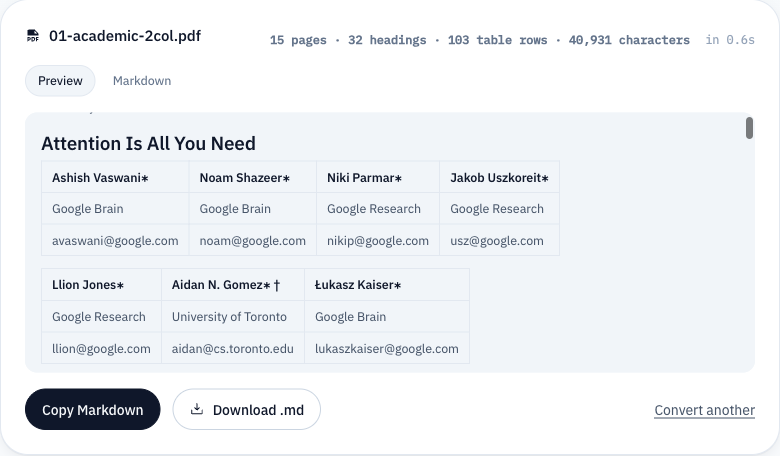
  3. The finished conversion, showing a rendered table and the copy and download buttons
    3

    Read it, copy it, download it

    The result opens rendered, so you can see for yourself that the headings and tables survived. Switch to the raw tab for the Markdown itself, then copy it or save a .md file.

What survives

What Does pdf2md Preserve?

Measured against a twelve-document sample set, not asserted. Two rows carry a warning because the measurement earned it.

In the PDFIn the MarkdownWhat Does pdf2md Preserve?
Headings# · ## · ###KeptLevels are re-derived from the type sizes in the document, so a six-level outline stays a six-level outline instead of collapsing into one.
ParagraphsPlain textKeptLines the PDF broke for layout are joined back into the paragraph they came from.
Links[text](url)Kept68 links across the sample set: 60 absolute http(s) addresses, and not one dead in-page anchor.
Tables| a | b |MostlyRows and columns come through. On dense financial layouts some cells land in the wrong column — the converter measures that and warns you above a 25% empty-cell rate.
Lists- item · 1. itemMostlyReal lists convert. Inside a financial table a nil dash can be read as a bullet; on the worst sample that was 12.5% of the items found.
ImagesDroppedNot kept. The text and its structure convert; pictures are dropped rather than left behind as links to files that do not exist.
Same PDF, four converters

PDF to MD Examples

All four ran on the same fifteen-page paper — Attention Is All You Need, a document anyone can download and check. Left is what the other converter returned. Right is what this one returns today.

A table stays a table

Table 1 of the paper has four columns and four rows. pdf2md.net returns it as one line of prose — and the whole file contains not a single table.

pdf2md.net
Layer Type Complexity per Layer Sequential Maximum Path Length Operations Self-Attention O(n 2 · d) O(1) O(1) Recurrent O(n · d 2 ) O(n) O(n) Convolutional O(k · n · d 2 ) O(1) O(logk(n)) Self-Attention (restricted) O(r · n · d) O(1) O(n/r)

0 table rows in the whole document

pdf2md.me
| Layer Type | Complexity per Layer | Sequential Operations | Maximum Path Length |
|---|---|---|---|
| Self-Attention | O(n2 · d) | O(1) | O(1) |
| Recurrent | O(n · d2 ) | O(n) | O(n) |
| Convolutional | O(k · n · d ) | O(1) | O(logk(n)) |

103 table rows across 10 tables

Headings keep their levels

PDF.ai marks 310 lines as second-level headings and not one as a first. The author block becomes eleven headings; a formula further down becomes eight more.

PDF.ai
## Attention Is All You Need
## Ashish Vaswani
## ∗
## Google Brain
avaswani@google.com
## Noam Shazeer
## ∗
## Google Brain

310 H2s, zero H1s

pdf2md.me
# Attention Is All You Need
## Abstract
### 1 Introduction
### 2 Background
### 3 Model Architecture
### 3.1 Encoder and Decoder Stacks
### 3.2 Attention
### 3.2.1 Scaled Dot-Product Attention

A three-level outline you can navigate

Links point somewhere

iLovePDF ends paragraphs with a link stub. Of its 43 links, 38 point at an anchor that does not exist, and every one of them has thrown away the text it was linking.

iLovePDF
...of recurrent language models and encoder-decoder architectures [38, 24, 15]. [URL 🔗](#page-0)
...ter. The fundamental constraint of sequential computation, however, remains. [URL 🔗](#page-0)
... such attention mechanisms are used in conjunction with a recurrent network. [URL 🔗](#page-0)

38 of 43 links are dead anchors

pdf2md.me
[arXiv:1607.06450, 2016.](http://arxiv.org/abs/1607.06450)
[arXiv:1308.0850, 2013.](http://arxiv.org/abs/1308.0850)
[arXiv:1703.10722, 2017.](http://arxiv.org/abs/1703.10722)
[arXiv:1609.08144, 2016.](http://arxiv.org/abs/1609.08144)

68 links across the sample set, zero dead anchors

Competitor output was captured in August 2026. Download any of it and check the numbers yourself.

Convert a PDF
What it is for

What Can You Use PDF to Markdown For?

AI and RAG workflows

A model handed raw PDF text reads tables as run-on lines and answers from the wrong column. Markdown keeps rows as rows, and heading levels give a retrieval index natural chunk boundaries that remember which section they came from.

Obsidian and Notion

A PDF attached to a vault or a page is a black box: not searchable with the rest of your notes, and something your teammates have to download to read. Both import Markdown directly — headings become headings and tables become tables.

Specs under version control

A PDF in a repository is an opaque blob. Every revision is a new binary and no reviewer can see what changed. Markdown diffs line by line and reviews in a pull request like any other file.

Editing what somebody sent you

PDF editors fight you over a single paragraph, because reflowing text is not what the format is for. Convert it once and change it in any editor you already have open.

The honest part

PDF Conversion Limitations

Everything below is something it will not do for you. It is here so you find out now rather than halfway through a document.

  • Scanned documents

    No text layer to read. Detected and reported, not handed back empty.

  • OCR

    None. Reading letters out of a picture is a different job.

    OCR is being worked on. Leave an email and we will tell you once — when it works.

    Used for that one email and nothing else. Want it removed? Write to hello@pdf2md.me.

  • Password-protected files

    Reported, not opened. Unlock the file in a PDF reader first.

  • Formulas

    Not recognised. Equations arrive as whatever characters the PDF stores.

  • Images

    Dropped, not extracted. You get the text and its structure.

  • Page count

    Up to 1,000 pages a file. A longer document converts its first 1,000 and says so.

  • File size

    No limit. Past 50 MB it warns you it may take a few seconds.

  • Multi-column layouts

    Body text keeps reading order. Anything spanning both columns can land out of position.

  • Complex tables

    Rows and columns survive; cell placement on dense financial layouts does not always.

  • Batch conversion

    One file at a time. There is no queue to wait in.

Privacy

Are My PDF Files Stored?

Does my file reach a server?
No. The converter is WebAssembly that runs inside this tab. Your PDF is read by code on your own machine and never becomes a network request.
Is it used to train anything?
No. It never arrives here, so there is nothing to train on.
How do I delete mine?
There is nothing of yours here to delete.
FAQ

You're probably wondering.

Still stuck? Email us — we reply within one business day.

Yes, completely. There is no account to create, no daily limit, and nothing to buy — a file can be up to 1,000 pages. Conversion runs on your own machine, so it costs us nothing to let you run it as often as you like.

Headings, yes: levels are re-derived from the type sizes in the document, so a fifteen-page paper comes out with a real outline rather than one flat level. Lists mostly: genuine bulleted and numbered lists convert, but inside a financial table a nil dash can be misread as a bullet.

Yes. Rows and columns come through as Markdown pipe tables — a 293-page annual report produced 2,469 table rows. On dense financial layouts some cells land in the wrong column; the converter measures that and warns you above a 25% empty-cell rate instead of leaving you to notice.

One thousand pages per file. Under that there is no limit of any kind — a 152-page annual report converts in a single pass. If a document is longer, the converter handles the first 1,000 pages and says so rather than quietly truncating.

Because the PDF does not record a table — it records text at coordinates, and the converter infers columns from horizontal alignment. Accounting layouts, where a currency symbol sits in its own gap and a nil value is a dash, break that inference. When more than a quarter of the cells come out empty, the result tells you.

No. A scanned page is a photograph with no text layer, and reading one requires OCR, which this converter does not have. It detects the case and tells you, rather than returning a blank document. You can leave an email address to be told once if that changes.

That is the main reason people convert. A model handed raw PDF text sees tables as run-on lines and answers from the wrong numbers; handed Markdown it sees rows as rows and headings as structure.

Nothing is uploaded, so there is nothing stored. The converter runs in your browser; your PDF never becomes a network request. You can check that yourself by disconnecting from the network after the page loads and converting a file anyway.

No account. No upload.
No catch

Scroll back up and drop a PDF on it. If the result is wrong you will be able to see that in about a second, which is rather the point.

Free · No sign-up · Up to 1,000 pages a file